

自动驾驶-nuscenes 3D 映射代码解读
读取与探索
explore_nuscenes.py
 #!/usr/bin/env python3
# -*- coding: utf-8 -*-
"""nuScenes 数据结构探索 —— 把关系型结构走一遍"""

import argparse
from nuscenes.nuscenes import NuScenes

def explore(dataroot, version="v1.0-mini"):
    # verbose=True 会打印加载统计,第一次跑建议开着看看
    nusc = NuScenes(version=version, dataroot=dataroot, verbose=True)

    print("\n" + "="*60)
    print("  数据集概览")
    print("="*60)
    print(f"场景数        : {len(nusc.scene)}")
    print(f"关键帧数      : {len(nusc.sample)}")
    print(f"传感器采样数  : {len(nusc.sample_data)}")
    print(f"标注框数      : {len(nusc.sample_annotation)}")
    print(f"物体实例数    : {len(nusc.instance)}")

    # ---------- 走一个 scene ----------
    scene = nusc.scene[0]
    print("\n" + "="*60)
    print("  第一个场景")
    print("="*60)
    print(f"名称   : {scene['name']}")
    print(f"描述   : {scene['description']}")
    print(f"帧数   : {scene['nbr_samples']}")

    # ---------- 走一个 sample ----------
    sample = nusc.get("sample", scene["first_sample_token"])
    print("\n" + "="*60)
    print("  第一个关键帧的传感器")
    print("="*60)
    for sensor_name, sd_token in sample["data"].items():
        sd = nusc.get("sample_data", sd_token)
        print(f"  {sensor_name:20} {sd['fileformat']:5} "
              f"{sd['width']}x{sd['height']}" if sd['width']
              else f"  {sensor_name:20} {sd['fileformat']}")

    # ---------- 看一路相机的标定 ----------
    cam_token = sample["data"]["CAM_FRONT"]
    cam_data = nusc.get("sample_data", cam_token)
    calib = nusc.get("calibrated_sensor", cam_data["calibrated_sensor_token"])
    pose = nusc.get("ego_pose", cam_data["ego_pose_token"])

    print("\n" + "="*60)
    print("  CAM_FRONT 标定参数")
    print("="*60)
    print(f"图像文件 : {cam_data['filename']}")
    print(f"外参平移 (相机在车身系) : {calib['translation']}")
    print(f"外参旋转 (四元数 wxyz)  : {calib['rotation']}")
    print(f"内参矩阵 K:")
    for row in calib["camera_intrinsic"]:
        print(f"    [{row[0]:9.3f} {row[1]:9.3f} {row[2]:9.3f}]")
    print(f"\n车身在全局系的位置 : {pose['translation']}")

    # ---------- 看标注 ----------
    print("\n" + "="*60)
    print(f"  本帧标注框(共 {len(sample['anns'])} 个,显示前 5 个)")
    print("="*60)
    for ann_token in sample["anns"][:5]:
        ann = nusc.get("sample_annotation", ann_token)
        print(f"  类别 : {ann['category_name']}")
        print(f"    全局位置 : [{ann['translation'][0]:.1f}, "
              f"{ann['translation'][1]:.1f}, {ann['translation'][2]:.1f}]")
        print(f"    尺寸 wlh : {ann['size']}")
        print(f"    可见度   : {ann['visibility_token']}")

    # ---------- 类别分布 ----------
    from collections import Counter
    cats = Counter(a["category_name"] for a in nusc.sample_annotation)
    print("\n" + "="*60)
    print("  类别分布(前 10)")
    print("="*60)
    for name, cnt in cats.most_common(10):
        print(f"  {name:42} {cnt:6d}")
    print("\n提示: 注意长尾分布 —— 少数类别占了绝大多数样本")
    print("      这正是后面 M4/M5 要处理的困难样本问题\n")

if __name__ == "__main__":
    ap = argparse.ArgumentParser()
    ap.add_argument("--dataroot", default="~/data/nuscenes")
    ap.add_argument("--version", default="v1.0-mini")
    args = ap.parse_args()

    import os
    explore(os.path.expanduser(args.dataroot), args.version)
探索结果:
 (ad) lunking@lianxiang-desktop:~/carla/work/nuscenes$ python explore_nuscenes.py --dataroot ~/data/nuscenes
======
Loading NuScenes tables for version v1.0-mini...
23 category,
8 attribute,
4 visibility,
911 instance,
12 sensor,
120 calibrated_sensor,
31206 ego_pose,
8 log,
10 scene,
404 sample,
31206 sample_data,
18538 sample_annotation,
4 map,
Done loading in 0.497 seconds.
======
Reverse indexing ...
Done reverse indexing in 0.1 seconds.
======

============================================================
  数据集概览
============================================================
场景数        : 10
关键帧数      : 404
传感器采样数  : 31206
标注框数      : 18538
物体实例数    : 911

============================================================
  第一个场景
============================================================
名称   : scene-0061
描述   : Parked truck, construction, intersection, turn left, following a van
帧数   : 39

============================================================
  第一个关键帧的传感器
============================================================
  RADAR_FRONT          pcd
  RADAR_FRONT_LEFT     pcd
  RADAR_FRONT_RIGHT    pcd
  RADAR_BACK_LEFT      pcd
  RADAR_BACK_RIGHT     pcd
  LIDAR_TOP            pcd
  CAM_FRONT            jpg   1600x900
  CAM_FRONT_RIGHT      jpg   1600x900
  CAM_BACK_RIGHT       jpg   1600x900
  CAM_BACK             jpg   1600x900
  CAM_BACK_LEFT        jpg   1600x900
  CAM_FRONT_LEFT       jpg   1600x900

============================================================
  CAM_FRONT 标定参数
============================================================
图像文件 : samples/CAM_FRONT/n015-2018-07-24-11-22-45+0800__CAM_FRONT__1532402927612460.jpg
外参平移 (相机在车身系) : [1.70079118954, 0.0159456324149, 1.51095763913]
外参旋转 (四元数 wxyz)  : [0.4998015430569128, -0.5030316162024876, 0.4997798114386805, -0.49737083824542755]
内参矩阵 K:
    [ 1266.417     0.000   816.267]
    [    0.000  1266.417   491.507]
    [    0.000     0.000     1.000]

车身在全局系的位置 : [411.4199861830012, 1181.197175631848, 0.0]

============================================================
  本帧标注框(共 69 个,显示前 5 个)
============================================================
  类别 : human.pedestrian.adult
    全局位置 : [373.3, 1130.4, 0.8]
    尺寸 wlh : [0.621, 0.669, 1.642]
    可见度   : 1
  类别 : human.pedestrian.adult
    全局位置 : [378.9, 1153.3, 0.9]
    尺寸 wlh : [0.775, 0.769, 1.711]
    可见度   : 2
  类别 : vehicle.car
    全局位置 : [353.8, 1132.4, 0.6]
    尺寸 wlh : [2.011, 4.633, 1.573]
    可见度   : 3
  类别 : human.pedestrian.adult
    全局位置 : [376.1, 1158.5, 0.9]
    尺寸 wlh : [0.752, 0.819, 1.637]
    可见度   : 4
  类别 : movable_object.trafficcone
    全局位置 : [410.1, 1196.8, 0.7]
    尺寸 wlh : [0.427, 0.359, 0.794]
    可见度   : 4

============================================================
  类别分布(前 10)
============================================================
  vehicle.car                                  7619
  human.pedestrian.adult                       4765
  movable_object.barrier                       2323
  movable_object.trafficcone                   1378
  vehicle.truck                                 649
  vehicle.motorcycle                            471
  vehicle.bus.rigid                             353
  vehicle.bicycle                               243
  vehicle.construction                          196
  human.pedestrian.construction_worker          193

提示: 注意长尾分布 —— 少数类别占了绝大多数样本
      这正是后面 M4/M5 要处理的困难样本问题

(ad) leoking@leoking-desktop:~/carla/work/nuscenes$
投影验证(本节核心产出)
这个脚本把 3D 标注框投影到相机图像上。如果框能准确套住物体,说明你的坐标变换理解正确—— 这是后面所有 BEV 工作的地基。
project_boxes.py
 #!/usr/bin/env python3
# -*- coding: utf-8 -*-
"""
把 nuScenes 的 3D 标注框投影到相机图像 —— 验证坐标变换是否正确

完整变换链(本节最重要的知识点):
    全局 --ego_pose⁻¹--> 车身 --calib⁻¹--> 相机 --K--> 像素

注意前两步都是「逆变换」,因为:
    ego_pose 描述「车身在全局系的位姿」,我们要把全局点转到车身系 → 取逆
    calib    描述「相机在车身系的位姿」,我们要把车身点转到相机系 → 取逆
"""

import argparse
import os

import numpy as np
import cv2
from nuscenes.nuscenes import NuScenes
from pyquaternion import Quaternion

# 3D 框的 12 条边(顶点索引对)
BOX_EDGES = [
    (0, 1), (1, 2), (2, 3), (3, 0),        # 顶面
    (4, 5), (5, 6), (6, 7), (7, 4),        # 底面
    (0, 4), (1, 5), (2, 6), (3, 7),        # 立柱
]

COLORS = {
    "vehicle":   (80, 220, 120),
    "human":     (100, 160, 255),
    "movable":   (80, 200, 255),
    "default":   (200, 200, 200),
}

def get_color(category):
    for key, c in COLORS.items():
        if category.startswith(key):
            return c
    return COLORS["default"]

def box_corners(center, size, rotation):
    """
    计算 3D 框的 8 个角点(全局坐标系)

    参数:
        center   : [x, y, z] 框中心
        size     : [w, l, h] 宽、长、高(注意 nuScenes 的顺序)
        rotation : 四元数 [w, x, y, z]
    返回:
        (3, 8) 数组
    """
    w, l, h = size

    # 在物体自身坐标系下的 8 个角点
    # x 沿车长方向, y 沿车宽, z 向上
    x_c = l / 2 * np.array([1, 1, 1, 1, -1, -1, -1, -1])
    y_c = w / 2 * np.array([1, -1, -1, 1, 1, -1, -1, 1])
    z_c = h / 2 * np.array([1, 1, -1, -1, 1, 1, -1, -1])
    corners = np.vstack((x_c, y_c, z_c))          # (3, 8)

    # 旋转 + 平移到全局系
    q = Quaternion(rotation)
    corners = np.dot(q.rotation_matrix, corners)
    corners = corners + np.array(center).reshape(3, 1)
    return corners

def global_to_camera(points, ego_pose, calib):
    """
    全局坐标 → 相机坐标(本函数是整节课的核心)

    points : (3, N)
    """
    # ---- 第 1 步: 全局 → 车身 ----
    # ego_pose 给的是「车身在全局的位姿」,所以要取逆
    points = points - np.array(ego_pose["translation"]).reshape(3, 1)
    points = np.dot(
        Quaternion(ego_pose["rotation"]).rotation_matrix.T,   # .T 即取逆(旋转阵正交)
        points)

    # ---- 第 2 步: 车身 → 相机 ----
    # calib 给的是「相机在车身的位姿」,同样取逆
    points = points - np.array(calib["translation"]).reshape(3, 1)
    points = np.dot(
        Quaternion(calib["rotation"]).rotation_matrix.T,
        points)

    return points

def camera_to_pixel(points, K):
    """
    相机坐标 → 像素坐标(针孔投影)

    points : (3, N),相机系下,z 为深度
    返回   : (2, N) 像素坐标, (N,) 深度
    """
    depths = points[2, :].copy()

    # 齐次投影: p = K @ P, 然后除以 z
    projected = np.dot(np.array(K), points)
    # 防止除零
    safe_z = np.where(np.abs(projected[2, :]) < 1e-6, 1e-6, projected[2, :])
    projected = projected[:2, :] / safe_z

    return projected, depths

def render_sample(nusc, sample_token, cam_name, out_path,
                  min_depth=1.0, max_depth=60.0):
    sample = nusc.get("sample", sample_token)
    cam_token = sample["data"][cam_name]
    cam_data = nusc.get("sample_data", cam_token)

    # 读图
    img_path = os.path.join(nusc.dataroot, cam_data["filename"])
    img = cv2.imread(img_path)
    if img is None:
        raise FileNotFoundError(f"读不到图像: {img_path}")

    # 取标定与位姿
    calib = nusc.get("calibrated_sensor", cam_data["calibrated_sensor_token"])
    pose = nusc.get("ego_pose", cam_data["ego_pose_token"])
    K = calib["camera_intrinsic"]

    n_drawn = 0
    for ann_token in sample["anns"]:
        ann = nusc.get("sample_annotation", ann_token)

        # 1) 算 8 个角点(全局系)
        corners = box_corners(ann["translation"], ann["size"], ann["rotation"])

        # 2) 全局 → 相机
        corners_cam = global_to_camera(corners, pose, calib)

        # 3) 过滤:所有角点都在相机后方 or 太远 → 跳过
        if np.all(corners_cam[2, :] < min_depth):
            continue
        if np.min(corners_cam[2, :]) > max_depth:
            continue
        # 有角点在后方的框投影会畸变,简单起见要求全部在前方
        if np.any(corners_cam[2, :] < min_depth):
            continue

        # 4) 相机 → 像素
        pts, depths = camera_to_pixel(corners_cam, K)

        # 5) 过滤画面外的
        h, w = img.shape[:2]
        if np.all(pts[0, :] < 0) or np.all(pts[0, :] > w):
            continue
        if np.all(pts[1, :] < 0) or np.all(pts[1, :] > h):
            continue

        # 6) 画 12 条边
        color = get_color(ann["category_name"])
        for i, j in BOX_EDGES:
            p1 = (int(pts[0, i]), int(pts[1, i]))
            p2 = (int(pts[0, j]), int(pts[1, j]))
            cv2.line(img, p1, p2, color, 2, cv2.LINE_AA)

        # 7) 标注类别与距离
        label = ann["category_name"].split(".")[-1]
        dist = np.mean(depths)
        text = f"{label} {dist:.0f}m"
        tx, ty = int(np.min(pts[0, :])), int(np.min(pts[1, :])) - 6
        cv2.putText(img, text, (tx, max(ty, 14)),
                    cv2.FONT_HERSHEY_SIMPLEX, 0.5, color, 1, cv2.LINE_AA)
        n_drawn += 1

    # 左上角信息条
    cv2.rectangle(img, (0, 0), (330, 30), (0, 0, 0), -1)
    cv2.putText(img, f"{cam_name}  |  drawn {n_drawn} boxes", (8, 20),
                cv2.FONT_HERSHEY_SIMPLEX, 0.55, (255, 255, 255), 1, cv2.LINE_AA)

    os.makedirs(os.path.dirname(out_path) or ".", exist_ok=True)
    cv2.imwrite(out_path, img)
    print(f"[{cam_name}] 画了 {n_drawn} 个框 → {out_path}")
    return n_drawn

def main():
    ap = argparse.ArgumentParser()
    ap.add_argument("--dataroot", default="~/data/nuscenes")
    ap.add_argument("--version", default="v1.0-mini")
    ap.add_argument("--out", default="./out_proj")
    args = ap.parse_args()

    nusc = NuScenes(version=args.version,
                    dataroot=os.path.expanduser(args.dataroot),
                    verbose=False)

    # 取第一个场景的第一帧,6 路相机全画一遍
    scene = nusc.scene[0]
    sample_token = scene["first_sample_token"]

    cams = ["CAM_FRONT", "CAM_FRONT_LEFT", "CAM_FRONT_RIGHT",
            "CAM_BACK", "CAM_BACK_LEFT", "CAM_BACK_RIGHT"]

    total = 0
    for cam in cams:
        out = os.path.join(args.out, f"{cam}.jpg")
        total += render_sample(nusc, sample_token, cam, out)

    print(f"\n共画出 {total} 个框(同一物体可能出现在多路相机中)")
    print(f"请打开 {args.out}/ 目录肉眼检查:")
    print("  ✓ 框能准确套住车辆行人 → 坐标变换正确")
    print("  ✗ 框错位/跑飞      → 检查是否漏了逆变换")

if __name__ == "__main__":
    main()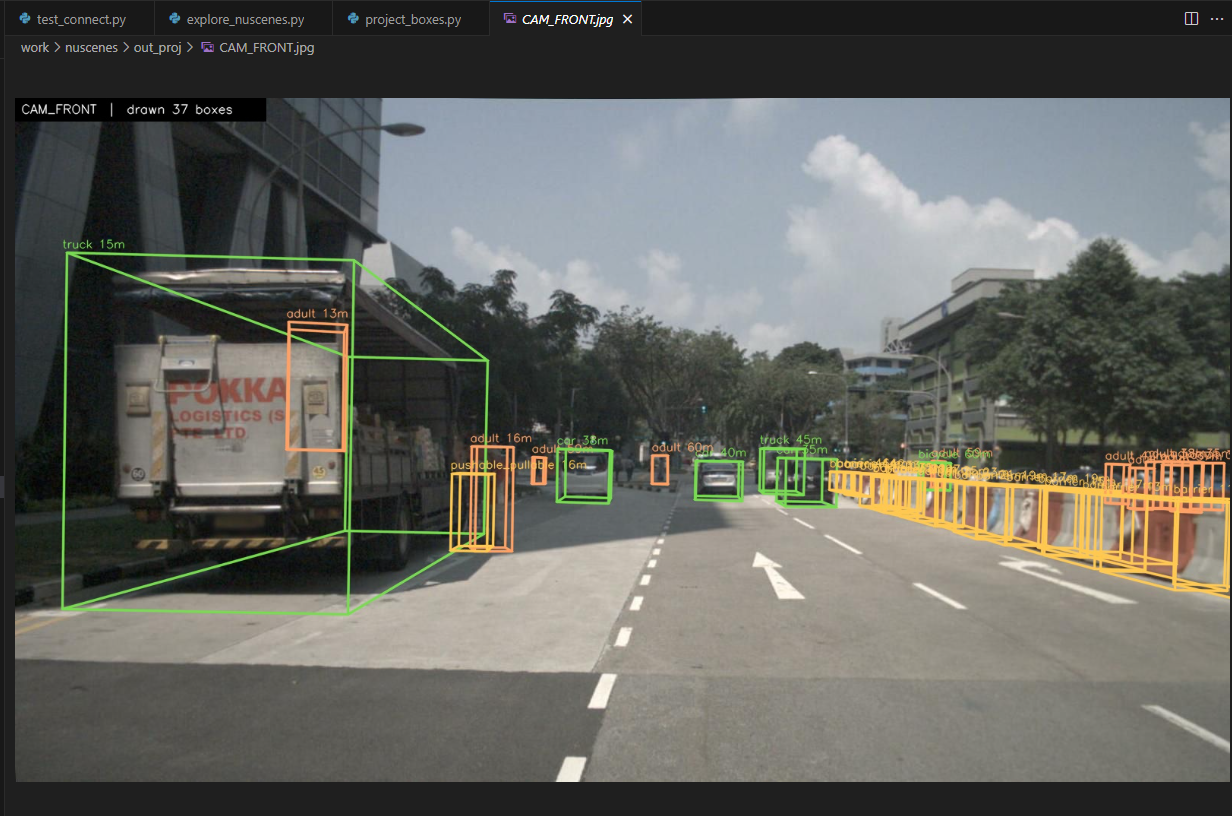
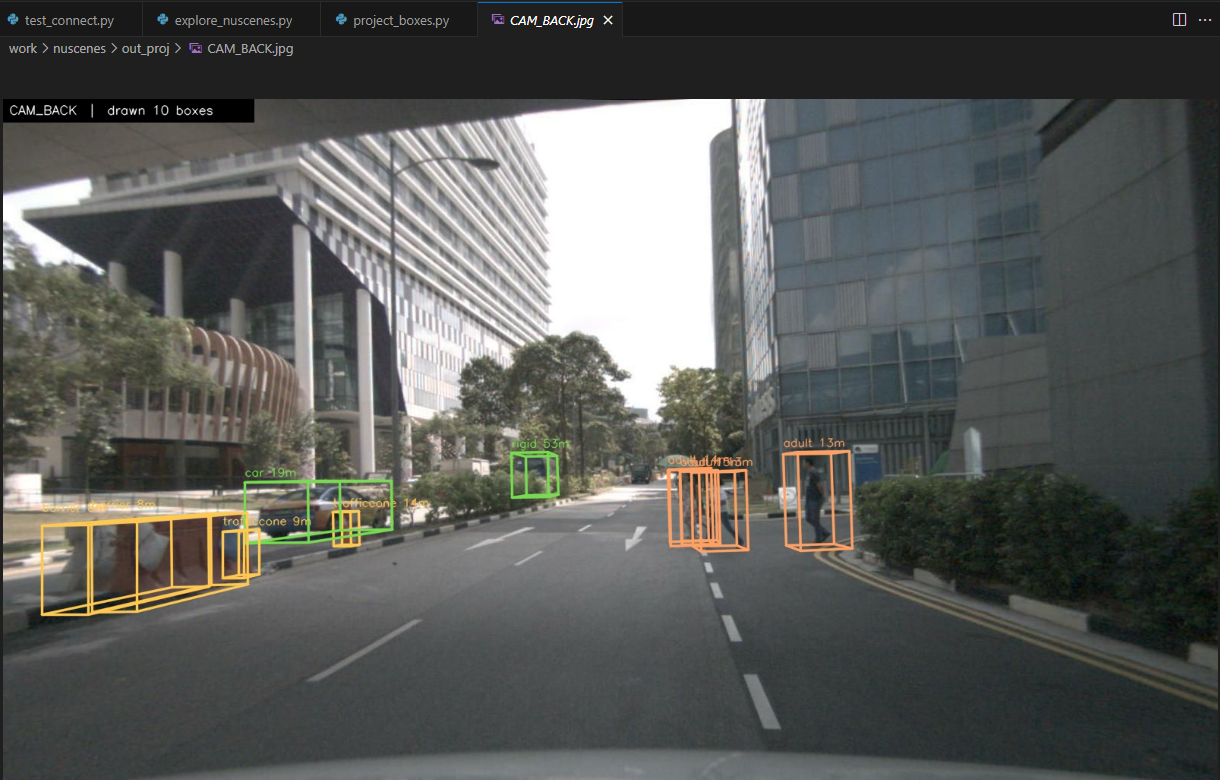
上边代码解读
这段代码的核心目的:验证 NuScenes 中「全局 → 车身 → 相机 → 像素」整条坐标变换链是否正确。
如果投影出来的 3D 框能准确套住图像中的车辆/行人,说明你对位姿逆变换、相机内外参理解无误——这正是后续所有 BEV(鸟瞰图)融合、多视角检测、LiDAR-Camera 对齐工作的地基。错一次就会导致后续所有几何计算全部偏移。
  # 取标定与位姿
calib = nusc.get("calibrated_sensor", cam_data["calibrated_sensor_token"])
pose = nusc.get("ego_pose", cam_data["ego_pose_token"])
K = calib["camera_intrinsic"]这三行代码是整个投影流程里获取几何参数的关键步骤。我们逐行拆开讲清楚。
# 取标定与位姿
calib = nusc.get("calibrated_sensor", cam_data["calibrated_sensor_token"])
pose = nusc.get("ego_pose", cam_data["ego_pose_token"])
K = calib["camera_intrinsic"]
1. 上下文:这些变量从哪来?
在 render_sample 函数里,前面已经做了:
sample = nusc.get("sample", sample_token)          # 拿到这一帧的总样本
cam_token = sample["data"][cam_name]               # 拿到指定相机(比如 CAM_FRONT)的 token
cam_data = nusc.get("sample_data", cam_token)      # 拿到这张图片的元数据
cam_data 是一个字典,里面存了这张相机图像的所有关键信息,其中包括两个重要的 token:
calibrated_sensor_token:指向「这个相机的标定参数」ego_pose_token:指向「拍这张照片时,自车在全局坐标系中的位姿」
2. 逐行解释
第一行
calib = nusc.get("calibrated_sensor", cam_data["calibrated_sensor_token"])作用:取出当前相机的外参 + 内参标定信息。
calib 字典里通常包含:
"translation":相机相对车身坐标系的平移(单位:米)"rotation":相机相对车身坐标系的旋转(四元数)"camera_intrinsic":相机内参矩阵 K(3×3)
这就是我们之前说的「车身 → 相机」那一步需要用到的 calib。
第二行
pose = nusc.get("ego_pose", cam_data["ego_pose_token"])作用:取出拍这张照片那一瞬间,自车在全局坐标系中的位姿。
pose 字典里包含:
"translation":自车在全局坐标系的位置 ([x, y, z])"rotation":自车在全局坐标系的朝向(四元数)
这就是我们反复强调的 ego_pose,后面 global_to_camera 里要对它取逆。
第三行
K = calib["camera_intrinsic"]作用:直接取出相机内参矩阵 ( K )。

后面 camera_to_pixel 函数会用它把相机坐标系下的 3D 点投影成像素坐标。
从你的 debug 信息可以看到实际的值:
K = [[1266.41, 0.0, 816.26],
     [0.0, 1266.41, 491.50],
     [0.0, 0.0, 1.0]]
这是典型的前视相机内参(焦距约 1266 像素,主点在图像中心附近)。
3. 这三行在整个变换链中的位置
全局坐标
   │
   │  用 pose(ego_pose)取逆
   ▼
车身坐标
   │
   │  用 calib 取逆
   ▼
相机坐标
   │
   │  用 K 投影
   ▼
像素坐标
没有这三行,后面的 global_to_camera 和 camera_to_pixel 就没有参数可用。
4. 为什么要分开取?
NuScenes 的数据组织是高度解耦的:
- 一张图片(sample_data)只存自己的 token
- 标定信息(calibrated_sensor)可能被很多图片共享(同一个相机标定不变)
- 位姿信息(ego_pose)每个时间戳都不同
所以必须通过 token 去查表,而不是把所有数据都塞在一张图片的记录里。这样设计更节省存储,也更灵活。
一句话总结:
这三行就是在告诉程序:
「这张照片是用哪个相机拍的(calib),拍的时候车在全局的什么位置和朝向(pose),以及这个相机的内参是多少(K)」。
有了它们,后面才能正确完成「全局 → 车身 → 相机 → 像素」的完整投影。
nuscenes-v1.0-mini 参数文件
calibrated_sensor.json (已标定的传感器)
[
    {
        "token": "f4d2a6c281f34a7eb8bb033d82321f79",
        "sensor_token": "47fcd48f71d75e0da5c8c1704a9bfe0a",
        "translation": [
            3.412,
            0.0,
            0.5
        ],
        "rotation": [
            0.9999984769132877,
            0.0,
            0.0,
            0.0017453283658983088
        ],
        "camera_intrinsic": []
    },

        {
"token": "193486c93d6b4cb894a2f5ff342f5820",
"sensor_token": "ca7dba2ec9f95951bbe67246f7f2c3f7",
"translation": [
1.0148780988,
-0.480568219723,
1.56239545128
],
"rotation": [
0.12280980120078765,
-0.132400842670559,
-0.7004305821388234,
0.690496031265798
],
"camera_intrinsic": [
[
1259.5137405846733,
0.0,
807.2529053838625
],
[
0.0,
1259.5137405846733,
501.19579884916527
],
[
0.0,
0.0,
1.0
]
]
},
]
ego_pose.json (自车位姿)
[
    {
        "token": "5ace90b379af485b9dcb1584b01e7212",
        "timestamp": 1532402927814384,
        "rotation": [
            0.5731787718287827,
            -0.0015811634307974854,
            0.013859363182046986,
            -0.8193116095230444
        ],
        "translation": [
            410.77878632230204,
            1179.4673290964536,
            0.0
        ]
    }
]
sample_data.json
[
{
"token": "5ace90b379af485b9dcb1584b01e7212",
"sample_token": "39586f9d59004284a7114a68825e8eec",
"ego_pose_token": "5ace90b379af485b9dcb1584b01e7212",
"calibrated_sensor_token": "f4d2a6c281f34a7eb8bb033d82321f79",
"timestamp": 1532402927814384,
"fileformat": "pcd",
"is_key_frame": false,
"height": 0,
"width": 0,
"filename": "sweeps/RADAR_FRONT/n015-2018-07-24-11-22-45+0800__RADAR_FRONT__1532402927814384.pcd",
"prev": "f0b8593e08594a3eb1152c138b312813",
"next": "978db2bcdf584b799c13594a348576d2"
},
{
"token": "37091c75b9704e0daa829ba56dfa0906",
"sample_token": "ca9a282c9e77460f8360f564131a8af5",
"ego_pose_token": "37091c75b9704e0daa829ba56dfa0906",
"calibrated_sensor_token": "f4d2a6c281f34a7eb8bb033d82321f79",
"timestamp": 1532402927664178,
"fileformat": "pcd",
"is_key_frame": true,
"height": 0,
"width": 0,
"filename": "samples/RADAR_FRONT/n015-2018-07-24-11-22-45+0800__RADAR_FRONT__1532402927664178.pcd",
"prev": "",
"next": "f0b8593e08594a3eb1152c138b312813"
}]
sample_annotation.json
[
{
"token": "70aecbe9b64f4722ab3c230391a3beb8",
"sample_token": "cd21dbfc3bd749c7b10a5c42562e0c42",
"instance_token": "6dd2cbf4c24b4caeb625035869bca7b5",
"visibility_token": "4",
"attribute_tokens": [
"4d8821270b4a47e3a8a300cbec48188e"
],
"translation": [
373.214,
1130.48,
1.25
],
"size": [
0.621,
0.669,
1.642
],
"rotation": [
0.9831098797903927,
0.0,
0.0,
-0.18301629506281616
],
"prev": "a1721876c0944cdd92ebc3c75d55d693",
"next": "1e8e35d365a441a18dd5503a0ee1c208",
"num_lidar_pts": 5,
"num_radar_pts": 0
},
{
"token": "7fa3a688931b4500b7ce29d187d3b975",
"sample_token": "2ff86dc19c4644a1a88ce5ba848f56e5",
"instance_token": "6dd2cbf4c24b4caeb625035869bca7b5",
"visibility_token": "4",
"attribute_tokens": [
"4d8821270b4a47e3a8a300cbec48188e"
],
"translation": [
373.152,
1130.357,
1.25
],
"size": [
0.621,
0.669,
1.642
],
"rotation": [
0.9831098797903927,
0.0,
0.0,
-0.18301629506281616
],
"prev": "1e8e35d365a441a18dd5503a0ee1c208",
"next": "913072e56d6c4025b9b47ba085dd6d7c",
"num_lidar_pts": 6,
"num_radar_pts": 0
}]
为者常成,行者常至
自由转载-非商用-非衍生-保持署名(创意共享3.0许可证)


